"Your Mac is up to date", but it no longer gets security updates
Software Update says everything is up to date. It's a half-truth: there's nothing new because Apple has stopped publishing updates for your Mac's macOS version.
(In Spanish on this Mac) Your Mac is up to date: macOS Big Sur 11.7.11
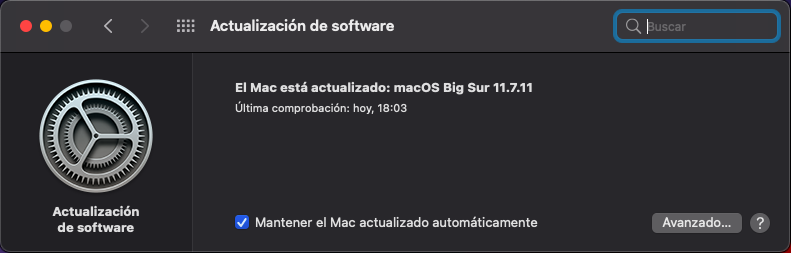
What it means
Apple publishes no official policy, but in practice it only ships security patches for the current macOS and the two before it: today, macOS 27, 26 Tahoe and 15 Sequoia. If your Mac can't install any of them, "up to date" means "nothing left to install", not "protected".
| macOS | Last security patch | Macs that stop there |
|---|---|---|
| 10.15 Catalina | July 2022 | 2012 models |
| 11 Big Sur | September 2023 (the 2026 11.7.11 carries no security fixes) | 2013 and 2014 MacBook Pro, Air and iMac |
| 12 Monterey | July 2024 | 2014 Mac mini, 2015 MacBook Pro and Air, 2015 iMac |
| 13 Ventura | August 2025 | 2017 MacBook Pro |
Programs follow: Chrome already asks for macOS 13 and Office for macOS 14. Without patches or an up-to-date browser the Mac still starts, but each month it's less safe for banking, email or government sites.
What you can do
- Free: use Firefox, which still updates from macOS 10.15 Catalina. It protects the most exposed part, the browser, though the rest of the system stays unpatched.
- Buy a new Mac, if you need to stay on macOS.
- Install Linux: the whole system gets security updates again, on the same Mac.
If you want to keep using this Mac with everything up to date
Linux is a free system that still gets updates on these Macs. With it you get up-to-date Chrome and Firefox, Office in the browser, LibreOffice and security patches again. The ResucitaTuMac Kit installs it for you with a wizard (in Spanish), without sending the Mac anywhere: you can keep macOS alongside and choose at power-on.
It's for Intel Macs from 2012 to 2015 and the 2017 MacBook Pro without Touch Bar. One-off payment of €24.99.
Check for free whether your Mac worksSee how it's done